Location Message
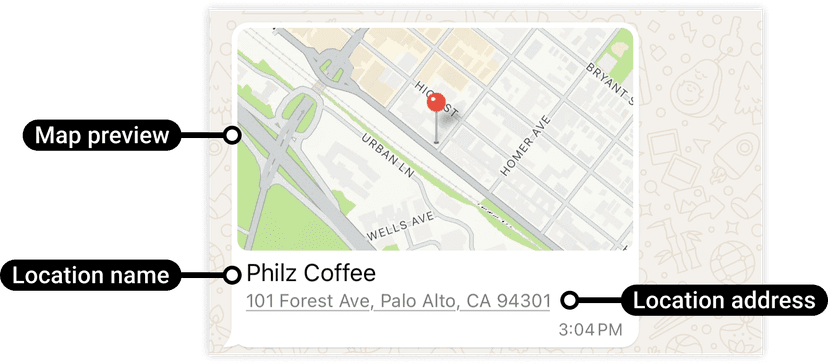
Example of a location message on WhatsApp
Location messages let you share a specific place or coordinates with users on WhatsApp. Each location includes latitude, longitude, name, and an optional address — making it ideal for sharing office locations, delivery destinations, or event venues.
cURL
curl -X POST '<BASE_URL>/api/whatsapp/location' \
-H 'Content-Type: application/json' \
-H 'Authorization: Bearer <ACCESS_TOKEN>' \
-d '{
  "contacts": [
    "<WHATSAPP_USER_PHONE_NUMBER>"
  ],
  "latitude": "37.44216251868683",
  "longitude": "-122.16153582049394",
  "name": "Philz Coffee",
  "address": "101 Forest Ave, Palo Alto, CA 94301"
}'
Parameters
| Parameter | Type | Description | Example |
|---|---|---|---|
| ACCESS_TOKEN | String Required | Whatsapp external api authorization token provided by business account. | ERYHCDIRMWORYFFEXESJDKR6SAZABA |
| CONTACTS | Array Required | Array of WhatsApp user phone numbers with country code. | ["<WHATSAPP_USER_PHONE_NUMBER>"] |
| LOCATION_LATITUDE | String Required | Latitude coordinate of the location to share. | 37.44216251868683 |
| LOCATION_LONGITUDE | String Required | Longitude coordinate of the location to share. | -122.16153582049394 |
| LOCATION_NAME | String Optional | Name of the place or business for the location message. | Philz Coffee |
| LOCATION_ADDRESS | String Optional | The address of the location being shared. | 101 Forest Ave, Palo Alto, CA 94301 |