Interactive Call-to-Action URL Button Message
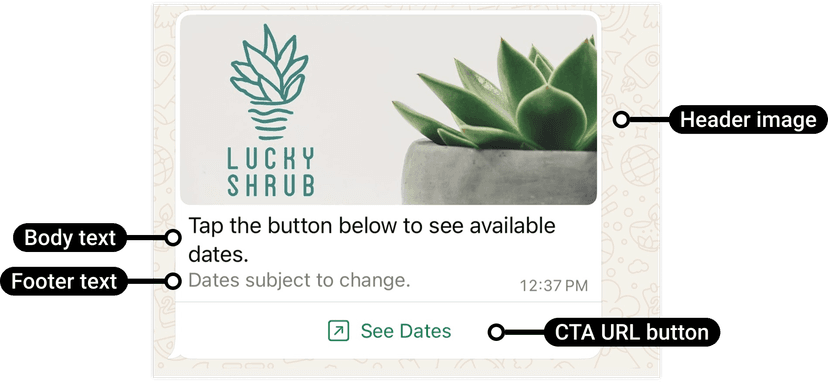
Example of an interactive URL button message on WhatsApp
Interactive Call-to-Action messages let you send a message with a clickable button that opens a specific web page. This is ideal for promoting events, booking systems, offers, or redirecting users to a landing page. You can also include a header (image, text, or video) and a footer for context.
curl -X POST '<BASE_URL>/api/whatsapp/interactive-cta-url' \
-H 'Content-Type: application/json' \
-H 'Authorization: Bearer <ACCESS_TOKEN>' \
-d '{
  "contacts": [
    "<WHATSAPP_USER_PHONE_NUMBER>"
  ],
  "body_text": "Tap the button below to see available dates.",
  "button_text": "See Dates",
  "button_url": "https://www.luckyshrub.com?clickID=kqDGWd24Q5TRwoEQTICY7W1JKoXvaZOXWAS7h1P76s0R7Paec4",
  "footer_text": "Dates subject to change.",
  "header_type": "image",
  "header_value": "https://randomuser.me/api/portraits/women/44.jpg"
}'
Parameters
| Parameter | Type | Description | Example |
|---|---|---|---|
| ACCESS_TOKEN | String Required | Whatsapp external api authorization token provided by business account. | ERYHCDIRMWORYFFEXESJDKR6SAZABA |
| CONTACTS | Array Required | Array of WhatsApp user phone numbers with country code. | ["<WHATSAPP_USER_PHONE_NUMBER>"] |
| BODY_TEXT | String Required | Body text. URLs are automatically hyperlinked. Maximum 1024 characters. | Tap the button below to see available dates. |
| BUTTON_URL | String Required | URL to load in the device's default web browser when tapped by the WhatsApp user. | https://www.luckyshrub.com?clickID=kqDGWd24Q5TRwoEQTICY7W1JKoXvaZOXWAS7h1P76s0R7Paec4 |
| BUTTON_LABEL_TEXT | String Required | Button label text. Must be unique if using multiple buttons. Maximum 20 characters. | See Dates |
| FOOTER_TEXT | String Optional | Footer text. URLs are automatically hyperlinked. | Dates subject to change. |
| HEADER_TYPE | String Optional | The type of header to include. Options: text, image, or video. | image |
| HEADER_VALUE | String Optional | The value of the header (URL for image/video or text content). | https://randomuser.me/api/portraits/women/44.jpg |
Interactive List Message
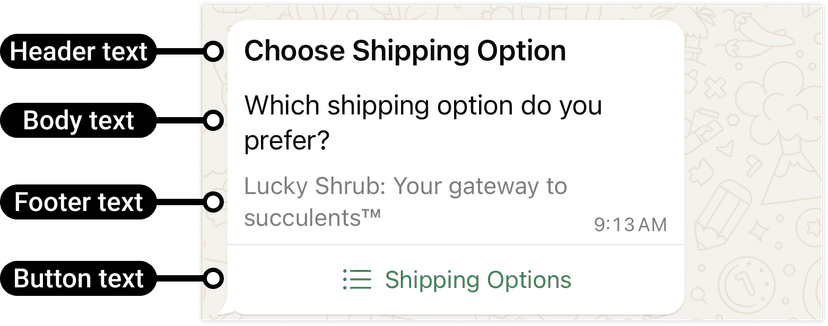
Example of an interactive list message on WhatsApp
Interactive list messages allow you to present multiple choices for users to select from — such as product types, shipping methods, or appointment slots. Each section can contain multiple rows, each with an id, title, and description. This makes it ideal for quick selections without needing the user to type responses.
When a user taps the button in the message, it displays a modal that lists the options available:

Example of an interactive list option message on WhatsApp
Users can then choose one option and their selection will be sent as a reply:

Example of an interactive list reply message on WhatsApp
curl -X POST '<BASE_URL>/api/whatsapp/interactive-list' \
-H 'Content-Type: application/json' \
-H 'Authorization: Bearer <ACCESS_TOKEN>' \
-d '{
  "contacts": [
    "<WHATSAPP_USER_PHONE_NUMBER>"
  ],
  "header": "Choose Shipping Option",
  "body": "Which shipping option do you prefer?",
  "footer": "Lucky Shrub: Your gateway to succulents™",
  "button": "Shipping Options",
  "sections": [
    {
      "title": "I want it ASAP!",
      "rows": [
        {
          "key": "priority_express",
          "title": "Priority Mail Express",
          "description": "Next Day to 2 Days"
        },
        {
          "key": "priority_mail",
          "title": "Priority Mail",
          "description": "1–3 Days"
        }
      ]
    },
    {
      "title": "I can wait a bit",
      "rows": [
        {
          "key": "usps_ground_advantage",
          "title": "USPS Ground Advantage",
          "description": "2–5 Days"
        },
        {
          "key": "media_mail",
          "title": "Media Mail",
          "description": "2–8 Days"
        }
      ]
    }
  ]
}'
Parameters
| Parameter | Type | Description | Example |
|---|---|---|---|
| ACCESS_TOKEN | String Required | WhatsApp external API authorization token provided by the business account. | ERYHCDIRMWORYFFEXESJDKR6SAZABA |
| CONTACTS | Array Required | Array of WhatsApp user phone numbers with country code. | ["<WHATSAPP_USER_PHONE_NUMBER>"] |
| MESSAGE_HEADER_TEXT | String Optional | The header object is optional. Supports text header type only. Maximum 60 characters. | Choose Shipping Option |
| MESSAGE_BODY_TEXT | String Required | The main message text that introduces the list to the user. Maximum 1024 characters. | Which shipping option do you prefer? |
| MESSAGE_FOOTER_TEXT | String Optional | Footer text displayed below the message for context. Maximum 60 characters. | Lucky Shrub: Your gateway to succulents™ |
| BUTTON_TEXT | String Required | Button label text. When tapped, reveals rows (options the WhatsApp user can tap). Supports a single button. Maximum 20 characters. | Shipping Options |
| SECTION_TITLE_TEXT | String Required | Section title text. At least 1 section is required. Supports up to 10 sections. Maximum 24 characters. | I want it ASAP! |
| key | String Required | Arbitrary string identifying the row. This key will be included in the webhook payload if the user submits the selection. At least one row is required. Supports up to 10 rows. Maximum 200 characters. | priority_express |
| ROW_TITLE_TEXT | String Required | Row title. At least 1 row is required. Supports up to 10 rows. Maximum 24 characters. | Priority Mail Express |
| ROW_DESCRIPTION_TEXT | String Required | Row description. Maximum 72 characters. | Next Day to 2 Days |
Interactive Reply Buttons Message
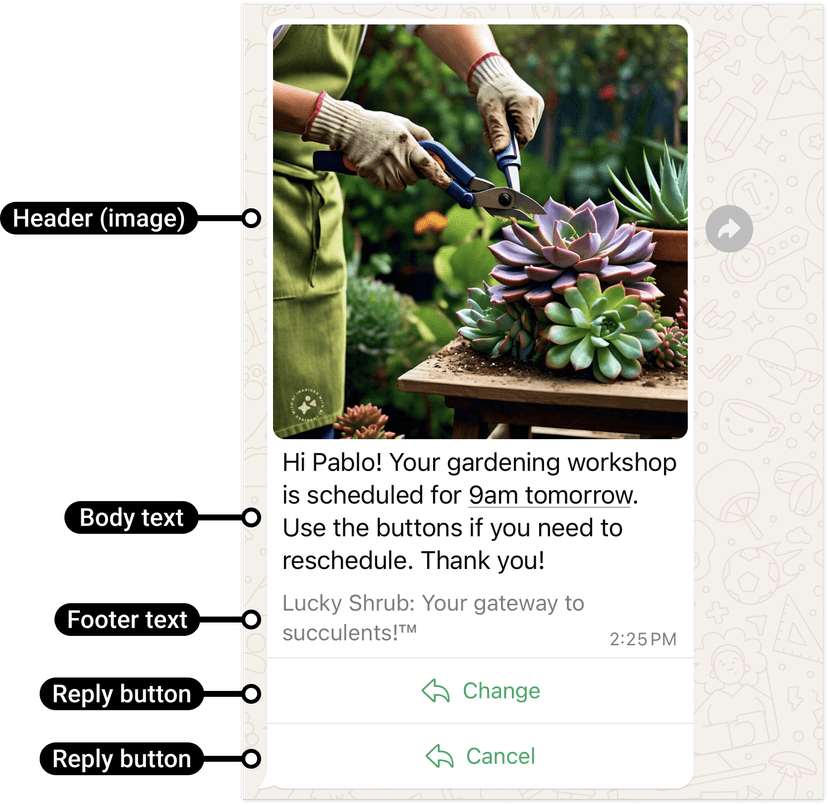
Example of an interactive reply buttons message on WhatsApp
Interactive reply buttons let you present up to 3 buttons that users can tap as responses without typing. Ideal for confirmations, quick actions, or scheduling changes — for example, allowing customers to confirm, cancel, or reschedule an appointment.
Users can respond to a message by selecting one of the predefined buttons, which triggers a messages webhook describing their selection.
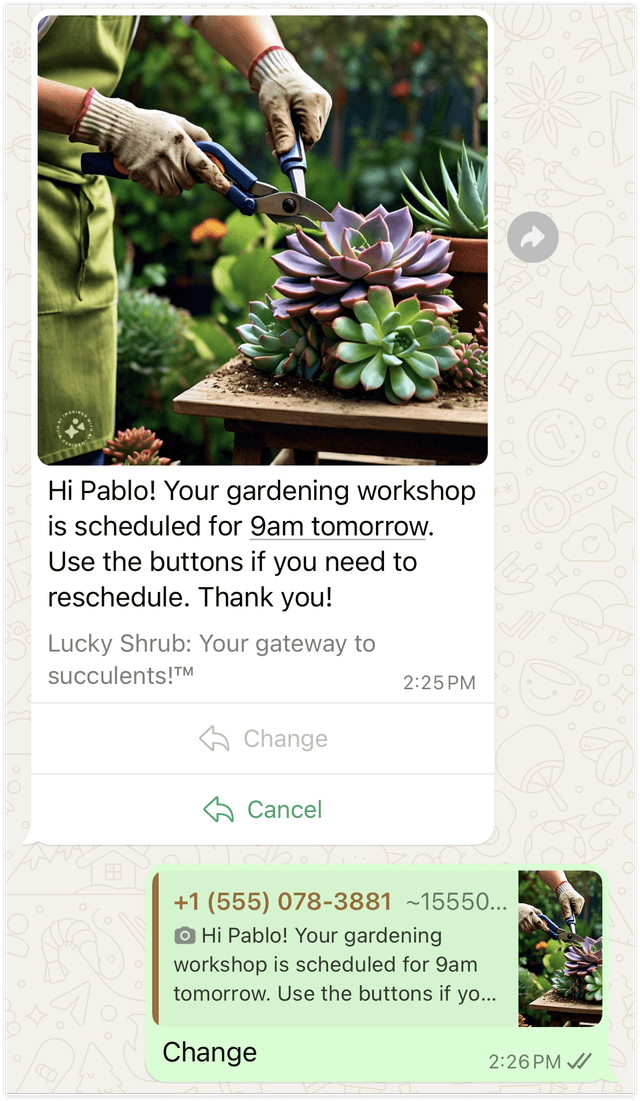
Example of an interactive user reply message on WhatsApp
curl -X POST '<BASE_URL>/api/whatsapp/interactive-reply' \
-H 'Content-Type: application/json' \
-H 'Authorization: Bearer <ACCESS_TOKEN>' \
-d '{
  "contacts": [
    "<WHATSAPP_USER_PHONE_NUMBER>"
  ],
  "header": {
    "type": "image",
    "link": "https://example.com/image.jpg"
  },
  "body": "Hi Pablo! Your gardening workshop is scheduled for 9am tomorrow. Use the buttons if you need to reschedule. Thank you!",
  "footer": "Lucky Shrub: Your gateway to succulents!™",
  "buttons": [
    {
      "id": "change-button",
      "title": "Change"
    },
    {
      "id": "cancel-button",
      "title": "Cancel"
    }
  ]
}'
Parameters
| Parameter | Type | Description | Example |
|---|---|---|---|
| ACCESS_TOKEN | String Required | WhatsApp external API authorization token provided by your business account. | ERYHCDIRMWORYFFEXESJDKR6SAZABA |
| CONTACTS | Array Required | Array of WhatsApp user phone numbers with country code. | ["<WHATSAPP_USER_PHONE_NUMBER>"] |
| HEADER_TYPE | String Optional | The type of header. Options: text, image, video, document, or none. | image |
| HEADER_LINK | String Optional | The media URL if the header type is not none. | https://example.com/image.jpg |
| MESSAGE_BODY_TEXT | String Required | The main text body of the message shown above the reply buttons.URLs are automatically hyperlinked Maximum 1024 characters. | Hi Pablo! Your gardening workshop is scheduled for 9am tomorrow. Use the buttons if you need to reschedule. Thank you! |
| MESSAGE_FOOTER_TEXT | String Optional | Footer text displayed below the message for additional context. Maximum 60 characters. | Lucky Shrub: Your gateway to succulents!™ |
| BUTTON_ID | String Required | A unique identifier for the button. Sent back to your webhook when the user taps the button. Maximum 256 characters. | change-button |
| BUTTON_TITLE_TEXT | String Required | The label text displayed on the button. Maximum 20 characters. Minimum 1 and supports up to 3 buttons. | Change |
Location Request Message
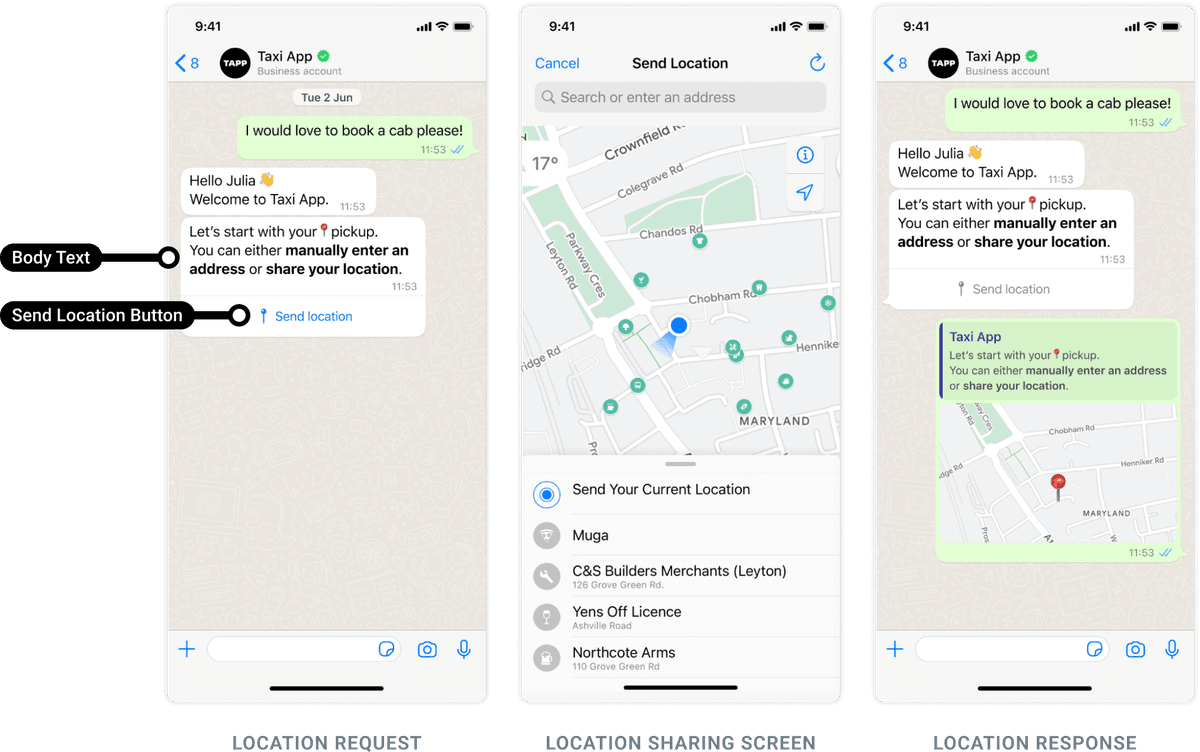
Example of a location request message on WhatsApp
Location request messages prompt users to share their real-time location directly in the chat. This is especially useful for delivery services, appointment confirmations, or pickups where the user's exact location is needed.
When sent, the message appears with a “Send Location” button, allowing users to send their GPS coordinates quickly without typing an address.
curl -X POST '<BASE_URL>/api/whatsapp/location-request' \
-H 'Content-Type: application/json' \
-H 'Authorization: Bearer <ACCESS_TOKEN>' \
-d '{
  "contacts": [
    "<WHATSAPP_USER_PHONE_NUMBER>"
  ],
  "body_text": "Thanks for your order! Tell us where to deliver it."
}'
Parameters
| Parameter | Type | Description | Example |
|---|---|---|---|
| ACCESS_TOKEN | String Required | WhatsApp external API authorization token provided by the business account. | ERYHCDIRMWORYFFEXESJDKR6SAZABA |
| CONTACTS | Array Required | Array of WhatsApp user phone numbers with country code. | ["<WHATSAPP_USER_PHONE_NUMBER>"] |
| BODY_TEXT | String Required | The text message shown to the user prompting them to share their location. Maximum 1024 characters. | Thanks for your order! Tell us where to deliver it. |