WhatsApp Template Messages
WhatsApp template messages are pre-approved message formats that allow businesses to send notifications, alerts, and promotional content to users who have opted in to receive messages. Templates ensure your business can initiate conversations even outside the 24-hour customer service window.
Each message template contains structured components — such as headers, body text, footers, and interactive buttons — which can include dynamic placeholders. These placeholders (variables) are replaced with personalized content when the message is sent, enabling a more engaging and contextual user experience.
Template Categories
WhatsApp templates are divided into three main categories:
- Marketing Templates — Used for promotional offers, announcements, and personalized recommendations to engage customers.
- Utility Templates — Used for transactional or informational updates such as order confirmations, delivery updates, or account alerts.
- Authentication Templates — Used for one-time passwords (OTPs) and verification codes during login or transaction validation.
Approval Process
All message templates must be approved before use. You can easily create, submit, and manage your WhatsApp message templates directly from our panel under the Your Templates section. Once submitted, our system automatically handles the approval process with WhatsApp on your behalf.
After approval, you can view and manage your templates — including their names, categories, and variable placeholders — within the same panel. These details are used when sending messages through our API.
How to Use Templates
To send a template message, follow these steps:
Step 1: Get Template Payload Information
First, retrieve the expected payload structure for your template by calling the payload info API. This endpoint returns the template structure, including all required variables, button configurations, and header components.
curl -X GET '<BASE_URL>/api/whatsapp/template/payload-info?template_name=invoice_template&template_language=en' \
-H 'Authorization: Bearer <ACCESS_TOKEN>'
The API response includes an example_payload field that shows the exact structure you need to send when calling the template API. This example payload contains all the required fields with sample values.
Step 2: Send Template Message
Use the example_payload from the previous API response as a reference to construct your request. Replace the sample values with your actual data and send it to the template API endpoint.
curl -X POST '<BASE_URL>/api/whatsapp/template' \
-H 'Content-Type: application/json' \
-H 'Authorization: Bearer <ACCESS_TOKEN>' \
-d '{
  "template_name": "invoice_template",
  "template_language": "en",
  "contacts": [
    "+15550185"
  ],
  "components": {
    "broadcast_title_type": "text",
    "broadcast_title_value": "",
    "variables": [
      {
        "variable": "{{1}}",
        "type": "text",
        "value": "Italy",
        "is_user": false
      },
      {
        "variable": "{{2}}",
        "type": "currency",
        "value": "5",
        "currency_code": "KWD"
      }
    ],
    "button_variables": [
      {
        "type": "url",
        "variables": [
          {
            "variable": "{{1}}",
            "type": "text",
            "value": "italy"
          }
        ]
      }
    ],
    "header_components": [
      {
        "variable": "{{1}}",
        "type": "text",
        "value": "Mega"
      }
    ]
  }
}'
Important: Always use the example_payload from the payload info API response as your reference. It provides the exact structure required for your specific template, including whether it's a carousel template and what components are available.
Below are categorized examples of template messages, their parameter structures, and example API payloads you can use to send different types of WhatsApp template messages.
Marketing Template Message
Marketing template messages are pre-approved WhatsApp templates used for sending promotional content such as discounts, product announcements, or reminders. They help businesses engage customers even outside the 24-hour customer service window.
These templates can include dynamic placeholders for personalization (like customer names, offer amounts, or expiry dates), along with media and buttons to increase engagement.
Example Template
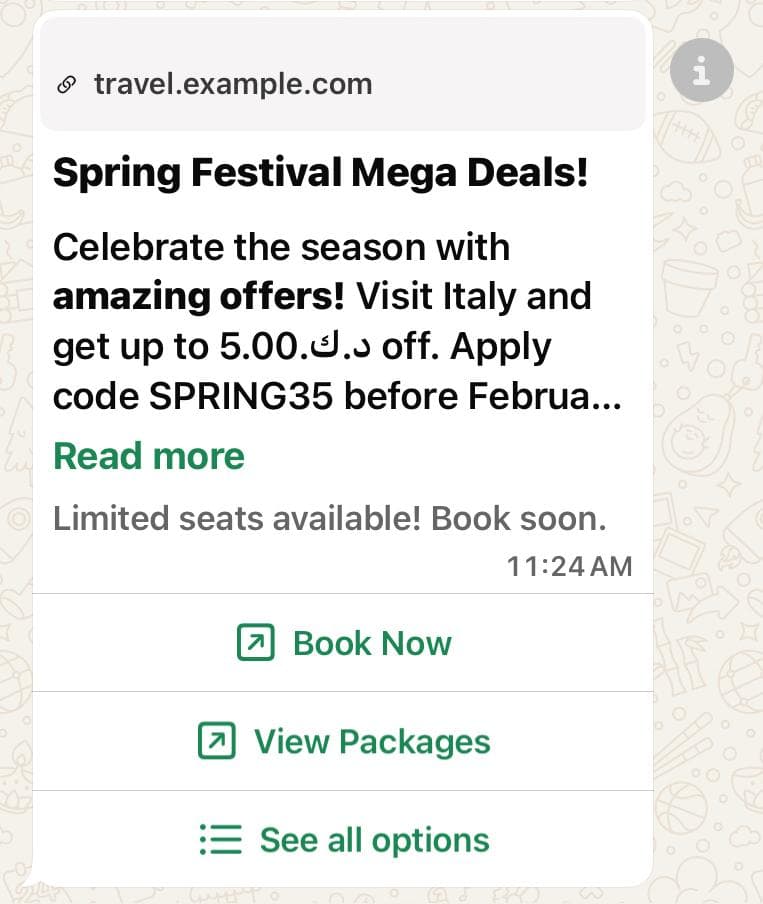
Example of a marketing template message with personalized placeholders and buttons.
This message uses placeholders such as {{1}}, {{2}}, and {{3}} which are dynamically replaced with customer data when the template is sent.
curl -X POST '<BASE_URL>/api/whatsapp/template' \
-H 'Content-Type: application/json' \
-H 'Authorization: Bearer <ACCESS_TOKEN>' \
-d '{
  "template_name": "spring_festival_sale",
  "template_language": "en",
  "contacts": [
    "<WHATSAPP_USER_PHONE_NUMBER>"
  ],
  "components": {
    "broadcast_title_type": "text",
    "broadcast_title_value": "",
    "variables": [
      {
        "variable": "{{1}}",
        "type": "text",
        "value": "Italy",
        "is_user": false
      },
      {
        "variable": "{{2}}",
        "type": "currency",
        "value": "5",
        "currency_code": "KWD"
      },
      {
        "variable": "{{3}}",
        "type": "text",
        "value": "SPRING35",
        "is_user": false
      },
      {
        "variable": "{{4}}",
        "type": "date_time",
        "value": "2026-02-28 12:15:00"
      }
    ],
    "button_variables": [
      {
        "type": "url",
        "variables": [
          {
            "variable": "{{1}}",
            "type": "text",
            "value": "italy"
          }
        ]
      },
      {
        "type": "url",
        "variables": [
          {
            "variable": "{{1}}",
            "type": "text",
            "value": "italy"
          }
        ]
      },
      {
        "type": "copy_code",
        "example": "SPRING35"
      },
      {
        "type": "phone_number",
        "variables": []
      },
      {
        "type": "quick_reply",
        "variables": []
      },
      {
        "type": "quick_reply",
        "variables": []
      },
      {
        "type": "quick_reply",
        "variables": []
      },
      {
        "type": "quick_reply",
        "variables": []
      },
      {
        "type": "quick_reply",
        "variables": []
      },
      {
        "type": "quick_reply",
        "variables": []
      }
    ],
    "header_components": [
      {
        "variable": "{{1}}",
        "type": "text",
        "value": "Mega"
      }
    ]
  }
}'
Parameters
| Parameter | Type | Description | Example |
|---|---|---|---|
| ACCESS_TOKEN | String Required | Whatsapp external api authorization token provided by business account. | ERYHCDIRMWORYFFEXESJDKR6SAZABA |
| CONTACTS | Array Required | Array of WhatsApp user phone numbers with country code. | ["<WHATSAPP_USER_PHONE_NUMBER>"] |
| TEMPLATE_NAME | String Required | The name of the approved WhatsApp marketing template to send. | spring_festival_sale |
| TEMPLATE_LANGUAGE | String Required | Language code for the template (e.g., en for English). | en |
| BROADCAST_TITLE_TYPE | String Required | Type of broadcast title (e.g., none, text, image, video, document). | image |
| BROADCAST_TITLE_VALUE | String Optional | Only required if type is not none or text. URL or value for the broadcast title. | https://example.com/image.jpg |
| VARIABLES | Array Required | Array of placeholder objects used in the template body. Each object contains:
Note: For date_time type, use format YYYY-MM-DD HH:mm:ss (e.g., "2026-02-28 12:15:00") | [
{ "variable": "{{1}}", "type": "text", "value": "Italy", "is_user": false },
{ "variable": "{{2}}", "type": "currency", "value": "5", "currency_code": "KWD", "is_user": false },
{ "variable": "{{3}}", "type": "text", "value": "SPRING35", "is_user": false },
{ "variable": "{{4}}", "type": "date_time", "value": "2026-02-28 12:15:00" }
] |
| BUTTON_VARIABLES | Array Optional | Array of button objects. Each button object contains:
Note: For url type buttons, the variable.value can be up to 2000 characters long. For copy_code, phone_number, and quick_reply buttons, the variables array should be empty. | [
{
"type": "url",
"variables": [
{
"variable": "{{1}}",
"type": "text",
"value": "italy"
}
]
},
{
"type": "copy_code",
"example": "SPRING35"
},
{
"type": "phone_number",
"variables": []
},
{
"type": "quick_reply",
"variables": []
}
] |
| HEADER_COMPONENTS | Array Optional | Array of header variable objects. Used when the template has a header with dynamic placeholders. Each object contains:
Note: Only include this field if your template has header components with variables. For carousel templates, headers are defined at the card level within carousel_variables, not here. | [
{
"variable": "{{1}}",
"type": "text",
"value": "Mega"
}
] |
Carousel Template Example
Carousel Template Structure: Carousel templates have a different structure compared to standard templates:
- No template-level header: Carousel templates do not have a
header_componentsfield at the template level. According to Meta's WhatsApp Business API documentation, carousel templates only have headers at the individual card level within thecarousel_variablesarray. - Broadcast title: Set
broadcast_title_typeto"none"andbroadcast_title_valueto an empty string for carousel templates. - Carousel variables: Each carousel card can have its own header (image or video), body variables, and button variables.
- Getting payload structure: Use the payload info API to get the exact structure for your carousel template. The
example_payloadin the response will show you the correct format.
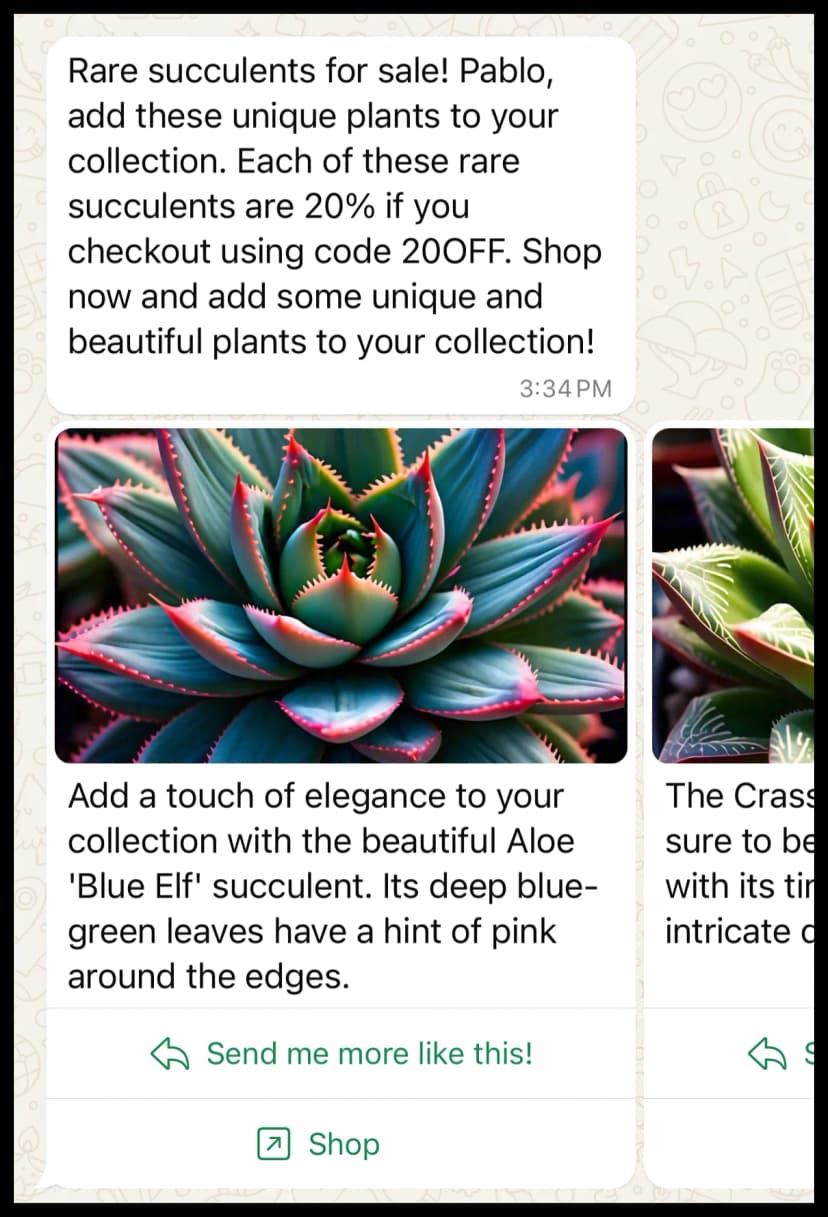
Example of a carousel template message with multiple items, headers, body placeholders, and buttons.
curl -X POST '<BASE_URL>/api/whatsapp/template' \
-H 'Content-Type: application/json' \
-H 'Authorization: Bearer <ACCESS_TOKEN>' \
-d '{
  "template_name": "webinar_promo_carousel",
  "template_language": "en",
  "contacts": [
    "<WHATSAPP_USER_PHONE_NUMBER>"
  ],
  "components": {
    "broadcast_title_type": "none",
    "broadcast_title_value": "",
    "variables": [
      {
        "variable": "{{1}}",
        "value": "John",
        "type": "text",
        "is_user": "true"
      }
    ],
    "carousel_variables": [
      {
        "header": {
          "format": "image",
          "value": "https://example.com/image.jpg"
        },
        "body_variables": [
          {
            "variable": "{{1}}",
            "value": "AI in Marketing",
            "type": "text"
          }
        ],
        "button_variables": [
          {
            "type": "quick_reply",
            "variables": []
          },
          {
            "type": "url",
            "variables": [
              {
                "variable": "{{1}}",
                "value": "Visit Us",
                "type": "text"
              }
            ]
          },
          {
            "type": "phone_number",
            "variables": []
          }
        ]
      },
      {
        "header": {
          "format": "image",
          "value": "https://example.com/image.jpg"
        },
        "body_variables": [],
        "button_variables": [
          {
            "type": "quick_reply",
            "variables": []
          },
          {
            "type": "url",
            "variables": []
          },
          {
            "type": "phone_number",
            "variables": []
          }
        ]
      },
      {
        "header": {
          "format": "image",
          "value": "https://example.com/image.jpg"
        },
        "body_variables": [],
        "button_variables": [
          {
            "type": "quick_reply",
            "variables": []
          },
          {
            "type": "url",
            "variables": []
          },
          {
            "type": "phone_number",
            "variables": []
          }
        ]
      }
    ]
  }
}'
Carousel Template Parameters
| Parameter | Type | Description | Example |
|---|---|---|---|
| VARIABLES | Array Optional | Array of placeholder objects for the main template body (outside carousel cards). Each object contains:
Note: This is for variables in the main body text that appears before the carousel cards. | [
{
"variable": "{{1}}",
"type": "text",
"value": "John",
"is_user": true
}
] |
| CAROUSEL_VARIABLES | Array Required | Array of carousel card objects. Each card object contains:
Note: Carousel templates must contain minimum 2 and maximum 10 cards. | [
{
"header": {
"format": "image",
"value": "https://example.com/image.jpg"
},
"body_variables": [...],
"button_variables": [...]
}
] |
| CAROUSEL_VARIABLES[].HEADER | Object Required | Header object for each carousel card. Contains:
Note: According to Meta's WhatsApp Business API documentation, carousel card headers must be either image or video. Text headers are not supported for carousel cards. | {
"format": "image",
"value": "https://example.com/image.jpg"
} |
| CAROUSEL_VARIABLES[].BODY_VARIABLES | Array Optional | Array of placeholder objects for the carousel card body. Each object contains:
Note: This array can be empty if the card body has no variables. | [
{
"variable": "{{1}}",
"type": "text",
"value": "AI in Marketing"
}
] |
| CAROUSEL_VARIABLES[].BUTTON_VARIABLES | Array Optional | Array of button objects for the carousel card. Each button object contains:
Note: For url type buttons, the variable.value can be up to 2000 characters long. For copy_code, phone_number, and quick_reply buttons, the variables array should be empty. | [
{
"type": "quick_reply",
"variables": []
},
{
"type": "url",
"variables": [
{
"variable": "{{1}}",
"type": "text",
"value": "Visit Us"
}
]
},
{
"type": "phone_number",
"variables": []
}
] |
Important Notes:
- Carousel templates must contain minimum 2 and maximum 10 cards.
- No template-level header: Unlike standard templates, carousel templates do not support
header_componentsat the template level. Headers are only defined at the individual card level within each carousel item'sheaderobject. - Ensure that all dynamic placeholders (
{{1}},{{2}}, etc.) are correctly matched with the approved template structure. - Always use the
example_payloadfrom the payload info API response to ensure you're using the correct structure for your specific carousel template.
Utility Template Message
Utility template messages are pre-approved WhatsApp templates used for transactional updates, confirmations, alerts, or notifications about services and operations. They help businesses provide timely information to customers.
These templates can include dynamic placeholders to personalize the message (like customer name, service name, or support email), and can also include media like images.
Example Template
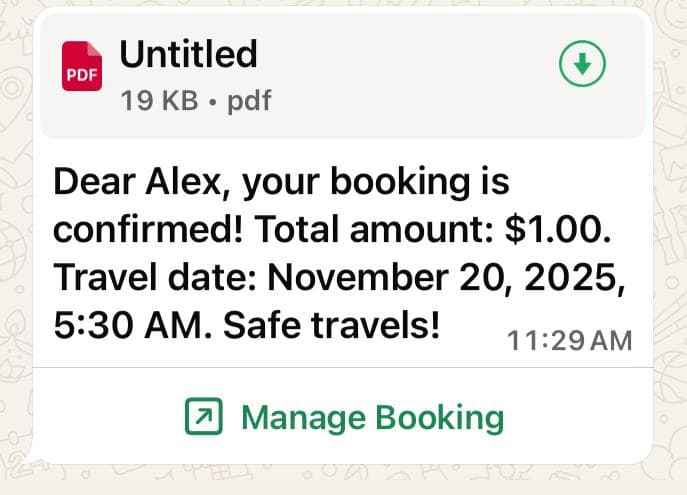
Example of a utility template message with personalized placeholders.
This message uses placeholders such as {{1}}, {{2}}, and {{3}} which are dynamically replaced with customer data when the template is sent.
curl -X POST '<BASE_URL>/api/whatsapp/template' \
-H 'Content-Type: application/json' \
-H 'Authorization: Bearer <ACCESS_TOKEN>' \
-d '{
  "template_name": "booking_confirmation",
  "template_language": "en",
  "contacts": [
    "+15550185"
  ],
  "components": {
    "broadcast_title_type": "document",
    "broadcast_title_value": "https://example.com/document.pdf",
    "variables": [
      {
        "variable": "{{1}}",
        "type": "text",
        "value": "Alex",
        "is_user": false
      },
      {
        "variable": "{{2}}",
        "type": "currency",
        "value": "1",
        "currency_code": "USD"
      },
      {
        "variable": "{{3}}",
        "type": "date_time",
        "value": "2025-11-20 10:30:00"
      }
    ],
    "button_variables": [
      {
        "type": "url",
        "variables": [
          {
            "variable": "{{1}}",
            "type": "text",
            "value": "12345"
          }
        ]
      },
      {
        "type": "phone_number",
        "variables": []
      },
      {
        "type": "quick_reply",
        "variables": []
      }
    ]
  }
}'
Parameters
| Parameter | Type | Description | Example |
|---|---|---|---|
| ACCESS_TOKEN | String Required | Whatsapp external api authorization token provided by business account. | ERYHCDIRMWORYFFEXESJDKR6SAZABA |
| CONTACTS | Array Required | Array of WhatsApp user phone numbers with country code. | ["<WHATSAPP_USER_PHONE_NUMBER>"] |
| TEMPLATE_NAME | String Required | The name of the approved utility template to send. | booking_confirmation |
| TEMPLATE_LANGUAGE | String Required | Language code for the template (e.g., en for English). | en |
| BROADCAST_TITLE_TYPE | String Required | Type of broadcast title (e.g., none, text, image, video, document). | document |
| BROADCAST_TITLE_VALUE | String Optional | Only required if type is not none or text. URL or value for the broadcast title. For document type, provide the full URL to the document file. | https://example.com/document.pdf |
| VARIABLES | Array Required | Array of placeholder objects used in the template body. Each object contains:
Note: For date_time type, use format YYYY-MM-DD or YYYY-MM-DD HH:mm:ss (e.g., "2025-11-20" or "2025-11-20 10:30:00") | [
{ "variable": "{{1}}", "type": "text", "value": "Alex", "is_user": false },
{ "variable": "{{2}}", "type": "currency", "value": "1", "currency_code": "USD", "is_user": false },
{ "variable": "{{3}}", "type": "date_time", "value": "2025-11-20 10:30:00" }
] |
| BUTTON_VARIABLES | Array Optional | Array of button objects. Each button object contains:
Note: For url type buttons, the variable.value can be up to 2000 characters long. For phone_number and quick_reply buttons, the variables array should be empty. | [
{
"type": "url",
"variables": [
{
"variable": "{{1}}",
"type": "text",
"value": "12345"
}
]
},
{
"type": "phone_number",
"variables": []
},
{
"type": "quick_reply",
"variables": []
}
] |
| HEADER_COMPONENTS | Array Optional | Array of header variable objects. Used when the template has a header with dynamic placeholders. Each object contains:
Note: Only include this field if your template has header components with variables. Many utility templates do not have header components, in which case this field can be omitted or set to null. | null
// or if header has variables:
[
{
"variable": "{{1}}",
"type": "text",
"value": "Header Text"
}
] |
Authentication Template Message
Authentication template messages are pre-approved WhatsApp templates used for sending verification codes, OTPs (One-Time Passwords), and authentication tokens to users. They help businesses securely verify user identity and authenticate transactions.
These templates typically include one dynamic placeholder for the authentication code (like {{1}} for the verification code). Authentication templates usually do not include media headers and focus on delivering the verification code clearly and securely.
Example Template
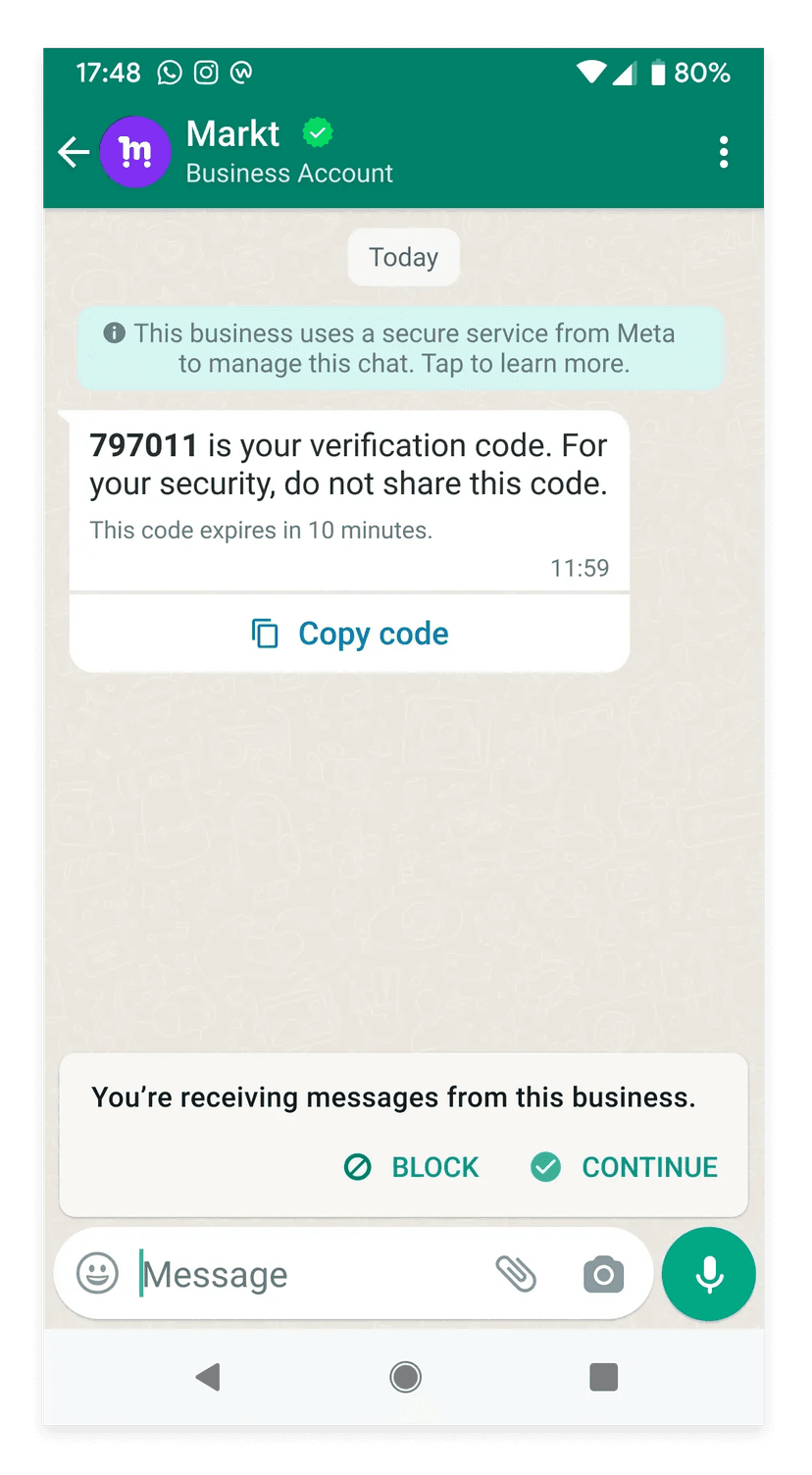
Example of an authentication template message with verification code placeholder.
Authentication templates contain only one variable - the verification code placeholder{{1}} which is dynamically replaced with the authentication code (e.g., "8528") when the template is sent. The broadcast_title_type is typically set to "none" for authentication templates.
curl -X POST '<BASE_URL>/api/whatsapp/template' \
-H 'Content-Type: application/json' \
-H 'Authorization: Bearer <ACCESS_TOKEN>' \
-d '{
  "template_name": "authentication_otp",
  "template_language": "en",
  "contacts": [
    "<WHATSAPP_USER_PHONE_NUMBER>"
  ],
  "components": {
    "broadcast_title_type": "none",
    "broadcast_title_value": "",
    "variables": [
      {
        "variable": "{{1}}",
        "type": "text",
        "value": "8528"
      }
    ]
  }
}'
Parameters
| Parameter | Type | Description | Example |
|---|---|---|---|
| ACCESS_TOKEN | String Required | Whatsapp external api authorization token provided by business account. | ERYHCDIRMWORYFFEXESJDKR6SAZABA |
| CONTACTS | Array Required | Array of WhatsApp user phone numbers with country code. | ["<WHATSAPP_USER_PHONE_NUMBER>"] |
| TEMPLATE_NAME | String Required | The name of the approved authentication template to send. | authentication_otp |
| TEMPLATE_LANGUAGE | String Required | Language code for the template (e.g., en for English). | en |
| BROADCAST_TITLE_TYPE | String Required | Type of broadcast title (e.g., none, text, image, video, document). For authentication templates, this is typically set to "none". | none |
| BROADCAST_TITLE_VALUE | String Optional | Only required if type is not none or text. URL or value for the broadcast title. For authentication templates with broadcast_title_type: "none", this should be an empty string. | |
| VARIABLES | Array Required | Array of placeholder objects used in the template. For authentication templates, this array contains only one variable - the verification code. Each object contains:
Important: Authentication templates contain only one variable in the array - the verification code. The value is the authentication code (e.g., "8528"). | [
{ "variable": "{{1}}", "type": "text", "value": "8528" }
] |